Snap a photo of any homework problem. Get a real solution.
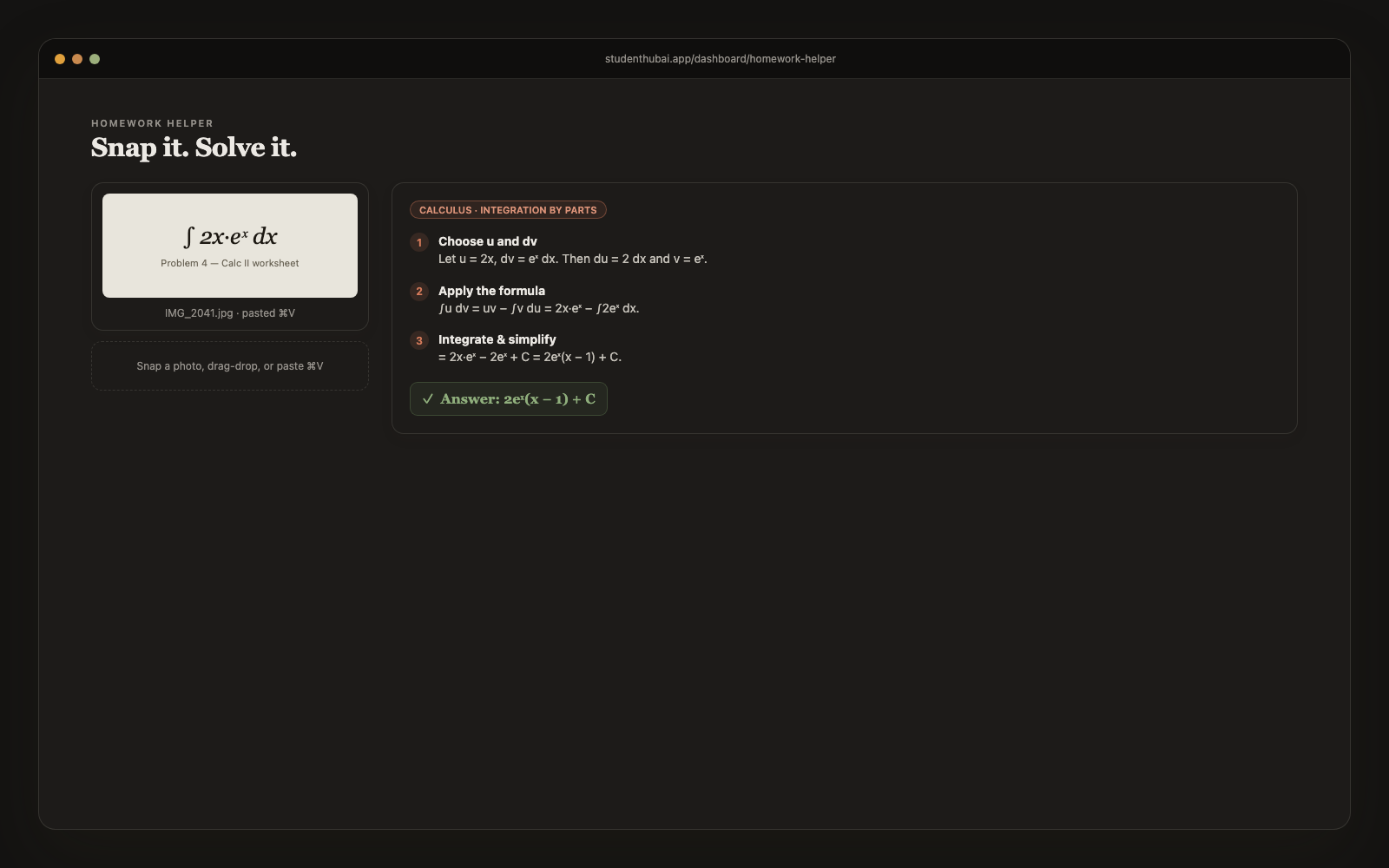
Math, chemistry, physics, code and stats. Point your camera or paste a screenshot. The AI reads the problem, identifies the subject, and walks you through each step with the reasoning behind it. Not just the answer.
Free plan · No credit card
How it works
Three steps. Done in 60 seconds.
Snap, drag, or paste
Use your phone camera, drag in a screenshot, or paste from clipboard with ⌘V. Works with whiteboard photos, textbook pages, Canvas screenshots, anything legible.
Add optional context
Pick the class, or type a hint like "use the quotient rule" or "this is from chapter 8". The AI uses it to disambiguate when the problem is ambiguous.
Get a step-by-step solution
Subject identified, problem summarized, numbered steps with reasoning, final answer highlighted, and a brief "why this works" concept explanation. Saved automatically to your history.
Why it works
Built for actual studying, not just demos.
Built for STEM (and beyond)
Calc, physics, organic chemistry, linear algebra, data structures, stats, microeconomics: the model knows the topics and explains in the conventions of each subject.
Reasoning, not just answers
Every step has a title and an explanation. You learn the move, not just the result. Great for prepping for exams where you need to show work.
Clipboard paste support
Hit ⌘V on the page and your most recent screenshot becomes the problem. Built for the workflow students actually have (constant Canvas screenshots).
Mobile camera, on the rear-facing lens
Hits the rear camera by default on iOS / Android: no fumbling with the wrong camera or having to take the photo first.
History sidebar that's actually useful
All your past problems on the side, clickable, shows the question + answer at a glance. "Did I already solve this?" answered in 2 seconds.
Doesn't count against your budget
Image solves don't draw on your monthly AI budget. The Free plan includes 3 a month, and Pro has a daily cap that is far more than a normal day of homework needs.
vs alternatives
Why students switch to StudentHubAI
FAQ
Common questions
What subjects does it handle?+
Math from algebra through calculus, linear algebra and discrete, every level of chemistry and physics, computer science (algorithms, syntax, debugging), statistics and microeconomics. It works out the subject from the photo and then uses that subject's conventions, so a chemistry answer is laid out like chemistry rather than generic math.
Will it write essays for me?+
No, and that's deliberate. The photo solver handles problem-shaped work: equations, code, structured questions. The essay tools are separate and they help you rework your own draft rather than producing something finished for you to hand in.
What happens with a blurry photo?+
It tells you it can't read the image instead of guessing. That matters more than it sounds, because a confident wrong answer is worse than no answer. Retake it with better light and it usually reads fine.
Can it do multi-part problems?+
Yes, and it keeps parts (a), (b) and (c) separate rather than running them together. If you only care about one part, say so in the context box.
Does it work on handwriting?+
Whiteboard photos, handwritten notes and printed pages all work. Neater handwriting reads better, which won't surprise you.
Is using this cheating?+
That depends on your course, and it's worth checking the policy before you rely on it. Our intent is that you see the reasoning, understand the method, and can then do the next one unaided. Copying an answer across without reading the working is how people fail the exam.
What does it cost?+
Pro is $5.99/month and covers the homework helper plus every other tool: notes, flashcards, practice tests, study guides, podcasts, essay tools, calendar and the tutor. The Free plan needs no card and includes a few homework solves each month.
Ready to make studying actually faster?
Free plan, no credit card. Pro whenever you want it.
Start free →More study tools